Compare step response functions with impulse response equations#
This notebook has two topics:
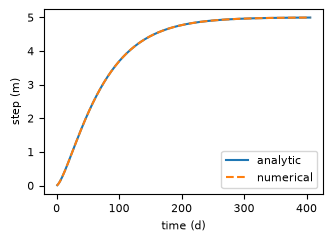
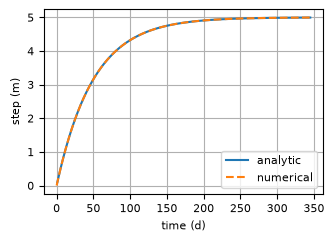
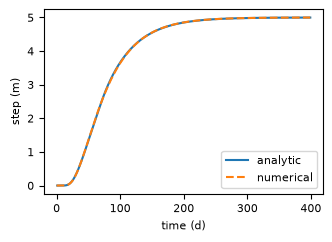
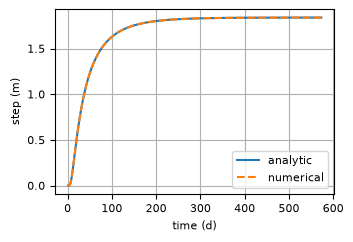
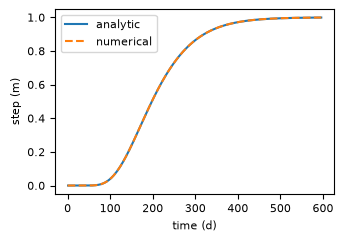
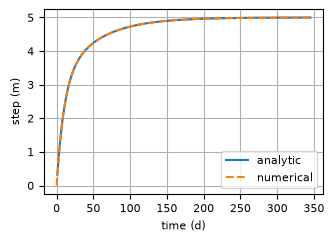
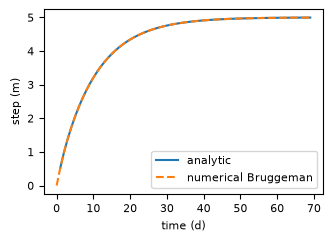
It checks the step response functions by numerically integrating the impulse response functions.
It compares the Polder, Hantush, and HantushWell response functions to their classical equivalents and gives relationships between the parameters used in Pastas and the aquifer parameters used in the classical functions.
from inspect import getsource

import matplotlib.pyplot as plt
import numpy as np
from scipy.integrate import quad
from scipy.special import exp1, k0, lambertw

import pastas as ps
plt.rcParams["figure.figsize"] = [3.6, 2.4]
plt.rcParams["font.size"] = 8
plt.rcParams["axes.grid"] = True
Comparison of step function with numerical integration of the impulse response function#
Gamma#
print(getsource(ps.Gamma.impulse))
    @staticmethod
    def impulse(t: ArrayLike, p: ArrayLike) -> ArrayLike:
        """Return the impulse response function for Gamma.

        Parameters
        ----------
        t : array_like
            Time array in days.
        p : array_like
            Response function parameters [A, n, a].

        Returns
        -------
        impulse : array_like
            Impulse response at times t.
        """
        A, n, a = p
        return A * t ** (n - 1) * np.exp(-t / a) / (a**n * gamma(n))
A = 5
n = 1.5
a = 50
p = [A, n, a]

gamma = ps.Gamma()
tmax = gamma.get_tmax(p)
t = np.arange(0, tmax)

step = gamma.step(p)
stepnum = np.zeros(len(t))
for i in range(1, len(t)):
    stepnum[i] = quad(gamma.impulse, 0, t[i], args=(p))[0]
plt.plot(t[1:], step, label="analytic")
plt.plot(t, stepnum, "--", label="numerical")
plt.xlabel("time (d)")
plt.ylabel("step (m)")
plt.grid()
_ = plt.legend()  # try to show figure in readthedocs
Exponential#
print(getsource(ps.Exponential.impulse))
    @staticmethod
    def impulse(t: ArrayLike, p: ArrayLike) -> ArrayLike:
        """Return the impulse response function for Exponential.

        Parameters
        ----------
        t : array_like
            Time array in days.
        p : array_like
            Response function parameters [A, a].

        Returns
        -------
        impulse : array_like
            Impulse response at times t.
        """
        A, a = p
        return A / a * np.exp(-t / a)
A = 5
a = 50
p = [A, a]

exponential = ps.Exponential()
tmax = exponential.get_tmax(p)
t = np.arange(0, tmax)

step = exponential.step(p)
stepnum = np.zeros(len(t))
for i in range(1, len(t)):
    stepnum[i] = quad(exponential.impulse, 0, t[i], args=(p))[0]
plt.plot(t[1:], step, label="analytic")
plt.plot(t, stepnum, "--", label="numerical")
plt.xlabel("time (d)")
plt.ylabel("step (m)")
_ = plt.legend()  # try to show figure in readthedocs
Hantush#
print(getsource(ps.Hantush.impulse))
    @staticmethod
    def impulse(t: ArrayLike, p: ArrayLike) -> ArrayLike:
        """Return the impulse response function for Hantush.

        Parameters
        ----------
        t : array_like
            Time array in days.
        p : array_like
            Response function parameters [A, a, b].

        Returns
        -------
        impulse : array_like
            Impulse response at times t.
        """
        A, a, b = p
        return A / (2 * t * kv(0, 2 * np.sqrt(b))) * np.exp(-t / a - a * b / t)
A = 5
a = 50
b = 2
p = [A, a, b]

hantush = ps.Hantush()
tmax = hantush.get_tmax(p)
t = np.arange(0, tmax)

step = hantush.step(p)
stepnum = np.zeros(len(t))
for i in range(1, len(t)):
    stepnum[i] = quad(hantush.impulse, 0, t[i], args=(p))[0]
plt.plot(t[1:], step, label="analytic")
plt.plot(t, stepnum, "--", label="numerical")
plt.xlabel("time (d)")
plt.ylabel("step (m)")
plt.grid()
_ = plt.legend()  # try to show figure in readthedocs
Polder#
print(getsource(ps.Polder.impulse))
    @staticmethod
    def impulse(t: ArrayLike, p: ArrayLike) -> ArrayLike:
        """Return the impulse response function for Polder.

        Parameters
        ----------
        t : array_like
            Time array in days.
        p : array_like
            Response function parameters [A, a, b].

        Returns
        -------
        impulse : array_like
            Impulse response at times t.
        """
        A, a, b = p
        return A * np.sqrt(a * b / pi) * t ** (-1.5) * np.exp(-t / a - a * b / t)
A = 5
a = 100
b = 0.25
p = [A, a, b]

polder = ps.Polder()
tmax = polder.get_tmax(p)
t = np.arange(0, tmax)

step = polder.step(p)
stepnum = np.zeros(len(t))
for i in range(1, len(t)):
    stepnum[i] = quad(polder.impulse, 0, t[i], args=(p))[0]
plt.plot(t[1:], step, label="analytic")
plt.plot(t, stepnum, "--", label="numerical")
plt.xlabel("time (d)")
plt.ylabel("step (m)")
_ = plt.legend()  # try to show figure in readthedocs
Four-parameter function#
print(getsource(ps.FourParam.impulse))
    @staticmethod
    def impulse(t: ArrayLike, p: ArrayLike) -> ArrayLike:
        """Return the impulse response function for FourParam.

        Parameters
        ----------
        t : array_like
            Time array in days.
        p : array_like
            Response function parameters [A, n, a, b].

        Returns
        -------
        impulse : array_like
            Impulse response at times t.
        """
        _, n, a, b = p
        return (t ** (n - 1)) * np.exp(-t / a - a * b / t)
A = 1  # impulse response implemented for A=1 only
n = 1.5
a = 50
b = 10
p = [A, n, a, b]

fourparam = ps.FourParam(quad=False)  # use simple integration
tmax = fourparam.get_tmax(p)
t = np.arange(0, tmax)

step = fourparam.step(p)
stepnum = np.zeros(len(t))
for i in range(1, len(t)):
    stepnum[i] = quad(fourparam.impulse, 0, t[i], args=(p))[0]
stepnum = (
    stepnum / quad(fourparam.impulse, 0, np.inf, args=p)[0]
)  # four param is scaled at the end
plt.plot(t[1:], step, label="analytic")
plt.plot(t, stepnum, "--", label="numerical")
plt.xlabel("time (d)")
plt.ylabel("step (m)")
plt.grid()
_ = plt.legend()  # try to show figure in readthedocs
Double exponential function#
print(getsource(ps.DoubleExponential.impulse))
    @staticmethod
    def impulse(t: ArrayLike, p: ArrayLike) -> ArrayLike:
        """Return the impulse response function for DoubleExponential.

        Parameters
        ----------
        t : array_like
            Time array in days.
        p : array_like
            Response function parameters [A, alpha, a1, a2].

        Returns
        -------
        impulse : array_like
            Impulse response at times t.
        """
        A, alpha, a_1, a_2 = p
        return A * (
            (1 - alpha) / a_1 * np.exp(-t / a_1) + alpha / a_2 * np.exp(-t / a_2)
        )
A = 5  # impulse response implemented for A=1 only
a = 10
b = 50
f = 0.4
p = [A, f, a, b]

doubexp = ps.DoubleExponential()
tmax = doubexp.get_tmax(p)
t = np.arange(0, tmax)

step = doubexp.step(p)
stepnum = np.zeros(len(t))
for i in range(1, len(t)):
    stepnum[i] = quad(doubexp.impulse, 0, t[i], args=(p))[0]
plt.plot(t[1:], step, label="analytic")
plt.plot(t, stepnum, "--", label="numerical")
plt.xlabel("time (d)")
plt.ylabel("step (m)")
_ = plt.legend()  # try to show figure in readthedocs
Kraijenhoff#
Kraijenhoff van de Leur#
Impulse Response#
from A study of non-steady groundwater flow with special reference to a reservoir-coefficient (1958) formula 2
\( \theta(t) = \frac{4N}{\pi S} \sum_{n=1,3,5...}^\infty \left( \frac{1}{n} \exp{\left( {-n^2\frac{\pi^2T}{SL^2} t} \right)} \sin \left(\frac{n\pi x}{L}\right) \right) \)
Step Response#
The step response is obtained by taking the integral of the impulse response function
\( \Theta(t) = \frac{4 N}{\pi S} \sum_{n=1,3,5...}^\infty \frac{1}{n^3} \left(\frac{SL^2}{\pi^2 T} - \frac{SL^2}{\pi^2 T} \exp\left(-n^2\frac{\pi^2T}{SL^2}t\right)\right) \sin \left(\frac{n\pi x}{L}\right) \)
\( \Theta(t) = \frac{4 N L^2}{\pi^3 T} \sum_{n=1,3,5...}^\infty \frac{1}{n^3} \left(1 - \exp\left(-n^2\frac{\pi^2T}{SL^2}t\right)\right) \sin \left(\frac{n\pi x}{L}\right)\)
And \(\sum_{n=1,3,5...}^\infty n = \sum_{n=0}^\infty (2n+1)\) gives:
\( \Theta(t) = \frac{4 N L^2}{\pi^3 T} \sum_{n=0}^\infty \frac{1}{(2n+1)^3} \left(1 - \exp\left(-(2n+1)^2\frac{\pi^2T}{SL^2}t)\right)\right) \sin \left(\frac{(2n+1)\pi x}{L}\right)\)
Kraijenhoff van de Leur takes \(\frac{x}{L}=\frac{1}{2}\) as the middle of the domain.
Bruggeman#
from Analytical Solutions of Geohydrological Problems (1999) formula 133.15
Step Response#
\( \Theta(t) = \frac{-N}{2T}\left(x^2 - \frac{1}{4}L^2\right) - \frac{4NL^2}{\pi^3T} \sum_{n=0}^\infty \frac{(-1)^n}{(2n + 1)^3} \cos\left(\frac{(2n+1)\pi x}{L}\right) \exp\left(-\frac{(2n+1)^2\pi^2 T}{SL^2}t\right) \)
\( \Theta(t) = \frac{-NL^2}{2T}\left(\left(\frac{x}{L}\right)^2 - \frac{1}{4}\right) - \frac{4NL^2}{\pi^3T} \sum_{n=0}^\infty \frac{(-1)^n}{(2n + 1)^3} \exp\left(-\frac{(2n+1)^2\pi^2 T}{SL^2}t\right) \cos\left(\frac{(2n+1)\pi x}{L}\right) \)
\( \Theta(t) = \frac{-NL^2}{2T}\left(\left(\frac{x}{L}\right)^2 - \tfrac{1}{4}\right) \left(1 - \frac{8}{\pi^3 \left(\frac{1}{4} - \left(\frac{x}{L}\right)^2\right)} \sum_{n=0}^\infty \frac{(-1)^n}{(2n + 1)^3} \exp\left(-\frac{(2n+1)^2\pi^2 T}{SL^2}t\right) \cos\left(\frac{(2n+1)\pi x}{L}\right) \right) \)
Note that \(x=0\) is the middle of the domain for Bruggeman.
Pastas Implementation#
In Pastas the Bruggeman response function is computed and the parameters are transformed to:
Scale parameter (such that the gain is always \(A\)):
\(A = \frac{-NL^2}{2T}\left(\left(\frac{x}{L}\right)^2 - \tfrac{1}{4}\right)\)
Reservoir coefficient (also known as \(j\) in Kraijenhoff):
\(a = \frac{SL^2}{\pi^2 T}\)
Location in the domain:
\(b = \frac{x}{L}\)
Such that the step response becomes:
\( \Theta(t) = A\left(1 - \frac{8}{\pi^3(\frac{1}{4} - b^2)} \sum_{n=0}^\infty \frac{(-1)^n}{(2n+1)^3} \cos\left((2n+1)\pi b\right)\exp\left(-\frac{(2n+1)^2t}{a}\right) \right)\)
Taking the derivative gives the impulse response:
print(getsource(ps.Kraijenhoff.impulse))
    @staticmethod
    def impulse(t: ArrayLike, p: ArrayLike, n_terms: int = 10) -> ArrayLike:
        """Return the impulse response function for Kraijenhoff.

        Parameters
        ----------
        t : array_like
            Time array in days.
        p : array_like
            Response function parameters [A, a, b].
        n_terms : int, optional
            Number of terms used in the truncated series expansion. Default is 10.

        Returns
        -------
        impulse : array_like
            Impulse response at times t.
        """
        A, a, b = p
        leading_term = A * 8 / (pi**3 * ((1 / 4) - b**2))

        h = 0.0
        for n in range(n_terms):
            k = 2 * n + 1
            oscillation_term = (-1) ** n / (a * k) * np.cos(k * pi * b)
            decay_term = np.exp(-(k**2 * t) / a)
            h += oscillation_term * decay_term

        return leading_term * h
A = 5
a = 10
b = 0.25
p = [A, a, b]

khoff = ps.Kraijenhoff()
tmax = khoff.get_tmax(p)
t = np.arange(0, tmax)

step = khoff.step(p)
stepnum_brug = np.zeros(len(t))

for i in range(1, len(t)):
    stepnum_brug[i] = quad(khoff.impulse, 0, t[i], args=(p))[0]
plt.plot(t[1:], step, label="analytic")
plt.plot(t, stepnum_brug, "--", label="numerical Bruggeman")
plt.xlabel("time (d)")
plt.ylabel("step (m)")
plt.grid()
_ = plt.legend()  # try to show figure in readthedocs
Comparison to classical analytical response functions#
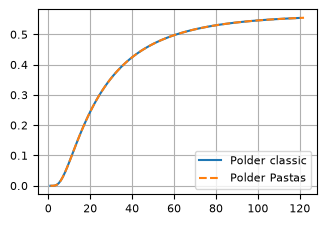
Polder step function compared to classic polder function#
The classic polder function is (Eq. 123.32 in Bruggeman, 1999)
where P is the polder function.
from scipy.special import erfc


def polder_classic(t, x, T, S, c):
    X = x / (2 * np.sqrt(T * c))
    Y = np.sqrt(t / (c * S))
    rv = 0.5 * np.exp(2 * X) * erfc(X / Y + Y) + 0.5 * np.exp(-2 * X) * erfc(X / Y - Y)
    return rv


delh = 2
T = 20
c = 5000
S = 0.01
x = 400
x / np.sqrt(c * T)
t = np.arange(1, 121)
h_polder_classic = np.zeros(len(t))
for i in range(len(t)):
    h_polder_classic[i] = delh * polder_classic(t[i], x=x, T=T, S=S, c=c)
#
A = delh
a = c * S
b = x**2 / (4 * T * c)
hpd = polder.step([A, a, b], dt=1, cutoff=0.95)
#
plt.plot(t, h_polder_classic, label="Polder classic")
plt.plot(np.arange(1, len(hpd) + 1), hpd, label="Polder Pastas", linestyle="--")
plt.legend()
<matplotlib.legend.Legend at 0x78cb1f112270>
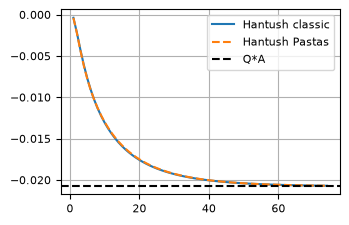
Hantush step function compared to classic Hantush function#
The classic Hantush function is
where
For large time, the classic Hantush function goes to
where \(\lambda^2=cT\). The classic Hantush function is a step function. The impulse response function \(\theta\) is obtained by differentiation
The Hantush impulse response function used in Pastas is defined as
Hence, the parameters in Pastas are related to the classic Hantush function as
def integrand_hantush(y, r, lab):
    return np.exp(-y - r**2 / (4 * lab**2 * y)) / y


def hantush_classic(t=1, r=1, Q=1, T=100, S=1e-4, c=1000):
    lab = np.sqrt(T * c)
    u = r**2 * S / (4 * T * t)
    F = quad(integrand_hantush, u, np.inf, args=(r, lab))[0]
    return -Q / (4 * np.pi * T) * F


# Hantush parameters
c = 200.0  # d
S = 0.1  # -
T = 100.0  # m^2/d
r = 100.0  # m
Q = 20.0  # m^3/d
lab = np.sqrt(T * c)

# Pastas Hantush parameters
A = k0(r / lab) / (2 * np.pi * T)
a = c * S
b = r**2 / (4 * T * c)

# calculate Pastas step response
ht = hantush.step([A, a, b], dt=1, cutoff=0.99) * -Q  # multiply by Q

# calculate classic Hantush step response
t = np.arange(1, len(ht) + 1)
h_hantush_classic = np.zeros(len(t))
for i in range(len(t)):
    h_hantush_classic[i] = hantush_classic(t[i], r=r, Q=Q, T=T, S=S, c=c)

# plot comparison
plt.plot(t, h_hantush_classic, label="Hantush classic")
plt.plot(np.arange(1, len(ht) + 1), ht, "--", label="Hantush Pastas")
plt.axhline(-Q * A, ls="dashed", c="k", label="Q*A")
_ = plt.legend()
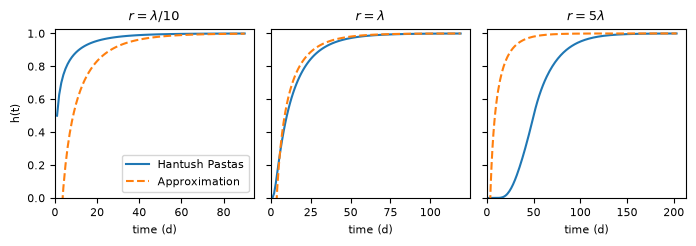
Approximation for the tmax of the Hantush response#
For large \(t\), the Hantush function may be approximated as
where
Using the \(a\) and \(b\) of pastas this gives
def hantush_approx(t, a, b):
    """ "Approximation of the Hantush step response for large times."""
    tau = t / a
    return (2 * k0(2 * np.sqrt(b)) - exp1(tau)) / (2 * k0(2 * np.sqrt(b)))


r_d = {r"$r=\lambda/10$": lab / 10, r"$r=\lambda$": lab, r"$r=5\lambda$": 5 * lab}

fig, axes = plt.subplots(1, 3, figsize=(7.0, 2.5), sharey=True, layout="tight")
for i, (r_t, r_i) in enumerate(r_d.items()):
    b_i = r_i**2 / (4 * lab**2)
    p = [1, a, b_i]
    h = ps.Hantush().step(p, dt=1, cutoff=0.999)
    t = np.arange(1, len(h) + 1)
    happ = hantush_approx(t, a, b)
    axes[i].plot(t, h, label="Hantush Pastas")
    axes[i].plot(t, happ, "--", label="Approximation")
    axes[i].set_title(r_t)
    axes[i].set_ylim(0.0, 1.025)
    axes[i].set_xlim(0.0)
    axes[i].grid()
    axes[i].set_xlabel("time (d)")
axes[0].set_ylabel("h(t)")
_ = axes[0].legend()
The goal is to find \(u\) such that
for \(\varepsilon\to 0\). The inverse function of \(\text{E}_1\) does not exist (in closed form). But \(\text{E}_1(u)\) may be approximated for small \(u\) as
Using this approximation, \(u\) may be found as is approximately
where W is the Lambert W function. Note that this gives the exact solution for \(\text{e}^{-u}/u=\varepsilon\) but not for \(\text{E}_1(u)=\varepsilon\)
eps = np.array([0.01, 0.001, 0.0001])
u = lambertw(1 / eps).real
print("E1(u): ", exp1(u))
print("exp(-u)/u: ", np.exp(-u) / u)
E1(u):  [8.03334337e-03 8.57524159e-04 8.89450783e-05]
exp(-u)/u:  [1.e-02 1.e-03 1.e-04]
The above approximation is used to estimate tmax for the Hantush function. This gives a conservative (so tmax is always longer than the true tmax) but not highly accurate estimate. There is a way to get the “true” tmax. This uses the approximation as initial guess and then uses a root finding algorithm to estimate the true tmax for a given cutoff. This is slower due to the root finding but more accurate. It can be used by setting approximate_tmax=False on initialization of the Hantush response
cutoff = 0.99
hantush_rfunc_approx_tmax = ps.Hantush(
    cutoff=cutoff,
    approximate_tmax=True,  # default=True
)
hantush_rfunc_exact_tmax = ps.Hantush(
    cutoff=cutoff,
    approximate_tmax=False,
)
tmax = hantush_rfunc_approx_tmax.get_tmax(p)
step = hantush_rfunc_approx_tmax.numpy_step(1, a, b, np.array([tmax]))[0]
print(f"pastas step response at approximate tmax for cutoff={cutoff}: {step: 0.7f}")

tmax = hantush_rfunc_exact_tmax.get_tmax(p)
step = hantush_rfunc_exact_tmax.numpy_step(1, a, b, np.array([tmax]))[0]
print(f"pastas step response at exact tmax for cutoff={cutoff}      : {step: 0.7f}")
pastas step response at approximate tmax for cutoff=0.99:  0.9999747
pastas step response at exact tmax for cutoff=0.99      :  0.9998650
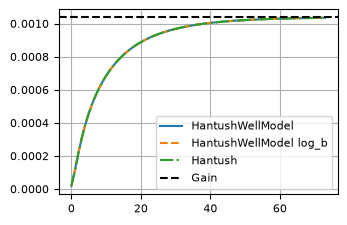
HantushWellModel step function in Pastas compared to classic Hantush function and Hantush function in Pastas#
The impulse response of the classic Hantush function is
The impulse response used for the HantushWellModel is
The HantushWellModel impulse response function used in Pastas is defined as
Where \( A^\prime \), \(a\), and \(b^\prime\) are fitting parameters. The parameters are named \(A^\prime \) and \(b^\prime\) to distinguish them from \(A\) and \(b\) in the original Hantush formulation. The fitting parameters are related to the geohydrological parameters as
and the gain of the HantushWellModel is
Note:
When log_b=True (default), the parameter \(b^\prime\) is
log10-transformed to avoid extremely small parameter values in the optimization. This
modifies the equations above slightly, replacing \(b^\prime\) with \(10^{b^\prime}\). The
computation of variance of the gain also changes since the derivative has to take into
account this change. The code adjusts the computations according to the
log_b=True parameter.
# compare pastas.Hantush to pastas.HantushWellModel
hantush = ps.Hantush(cutoff=cutoff)
hantush.update_rfunc_settings(up=False)
h = hantush.step([A, a, b], dt=1.0)

# HantushWellmodel parameters
hantush_wm = ps.HantushWellModel(cutoff=cutoff, log_b=False)
hantush_wm.update_rfunc_settings(up=False)
hantush_wm.set_distances(1.0)
bprime = 1 / (4 * T * c)
Aprime = A / k0(2 * r * np.sqrt(bprime))
h_wm = hantush_wm.step([Aprime, a, bprime, r], dt=1.0)

# HantushWellmodel log10 b parameters (default)
hantush_wmlb = ps.HantushWellModel(cutoff=cutoff, log_b=True)
hantush_wmlb.update_rfunc_settings(up=False)
hantush_wmlb.set_distances(1.0)
bprime_lb = np.log10(bprime)
Aprime_lb = A / k0(2 * r * 10 ** (bprime_lb / 2))
h_wmlb = hantush_wmlb.step([Aprime_lb, a, bprime_lb, r], dt=1.0)

plt.plot(h_wm, "-", label="HantushWellModel")
plt.plot(h_wmlb, "--", label="HantushWellModel log_b")
plt.plot(h, "-.", label="Hantush")
plt.axhline(A, ls="dashed", color="k", label="Gain")
plt.legend()
<matplotlib.legend.Legend at 0x78cb1efc8440>
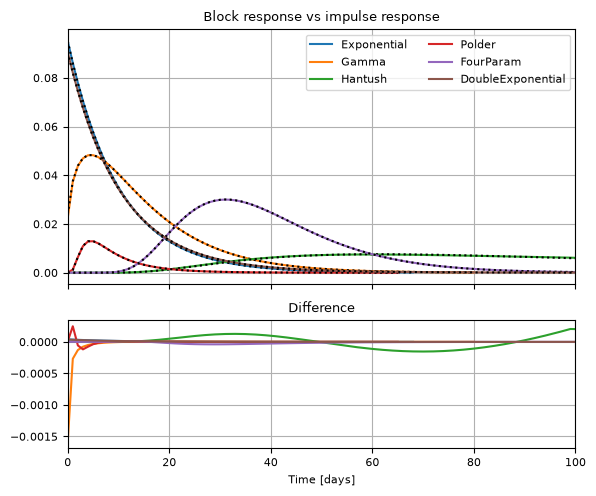
Comparison of block response and impulse response#
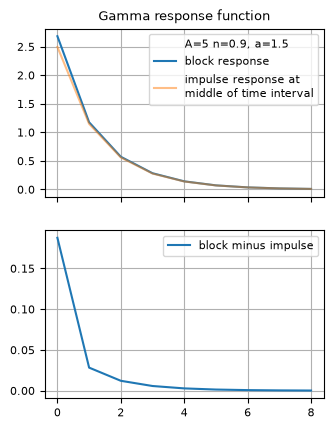
Pastas has the option to compute the block response function (derived by taking the difference of the step response) or the impulse response function for convolution. The impulse response is then evaluated at the middle of the time interval. We can compare this to the block response, where it is expected to be close for larger response times. Note that the step response is still sometimes used to compute the tmax for the appropriate cutoff.
Gamma#
A = 5.0
n = 1.5
a = 20.0
p = [A, n, a]

gamma_s = ps.Gamma(use_block=True)
gamma_i = ps.Gamma(use_block=False)

block_s = gamma_s.block(p)
# calls block_from_impulse internally which computes the impulse response at the middle of the time interval
block_i = gamma_i.block(p)
f, ax = plt.subplots(2, 1, sharex=True, figsize=(3.6, 4.8))
ax[0].set_title("Gamma response function")
ax[0].plot([], [], label=f"{A=} {n=}, {a=}", color="w")
ax[0].plot(block_s, label="block response")
ax[0].plot(block_i, label="impulse response at\nmiddle of time interval", alpha=0.5)
ax[0].legend()
ax[1].plot(
    block_s - block_i,
    label="block minus impulse",
)
ax[1].legend()
ax[1].grid(True)
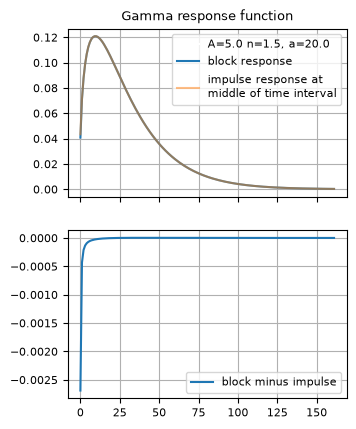
If the response is very short, the block response and impulse response start to differ more.
A = 5
n = 0.9
a = 1.5
p = [A, n, a]

gamma_s = ps.Gamma(use_block=True)
gamma_i = ps.Gamma(use_block=False)

block_s = gamma_s.block(p)
block_i = gamma_i.block(p)

f, ax = plt.subplots(2, 1, sharex=True, figsize=(3.6, 4.8))
ax[0].set_title("Gamma response function")
ax[0].plot([], [], label=f"{A=} {n=}, {a=}", color="w")
ax[0].plot(block_s, label="block response")
ax[0].plot(block_i, label="impulse response at\nmiddle of time interval", alpha=0.5)
ax[0].legend()
ax[1].plot(
    block_s - block_i,
    label="block minus impulse",
)
ax[1].legend()
<matplotlib.legend.Legend at 0x78cb1ca6cd70>
Hantush#
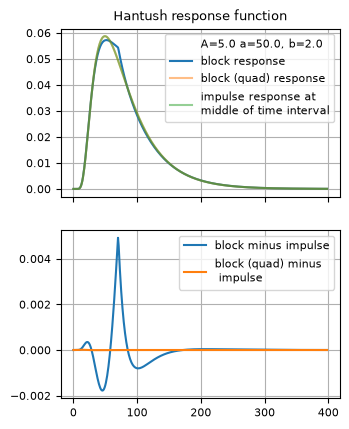
Hantush uses an approximation for the step response function which results in a less accurate block response function. Therefore using the impulse response function for computing the block response might give a more accurate result.
A = 5.0
a = 50.0
b = 2.0
p = [A, a, b]

hantush_s = ps.Hantush(use_block=True)
hantush_sq = ps.Hantush(use_block=True, quad=True)
hantush_i = ps.Hantush(use_block=False)

block_s = hantush_s.block(p)
block_sq = hantush_sq.block(p)
block_i = hantush_i.block(p)

f, ax = plt.subplots(2, 1, sharex=True, figsize=(3.6, 4.8))
ax[0].set_title("Hantush response function")
ax[0].plot([], [], label=f"{A=} {a=}, {b=}", color="w")
ax[0].plot(block_s, label="block response")
ax[0].plot(block_sq, label="block (quad) response", linestyle="-", alpha=0.5)
ax[0].plot(
    block_i,
    label="impulse response at\nmiddle of time interval",
    linestyle="-",
    alpha=0.5,
)
ax[0].legend()
ax[1].plot(block_s - block_i, label="block minus impulse", linestyle="-")
ax[1].plot(
    block_sq - block_i,
    label="block (quad) minus\n impulse",
    linestyle="-",
)

ax[1].legend()
ax[1].grid(True)
FourParam#
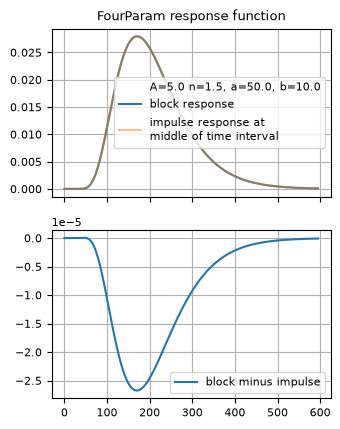
The step response, and thus the block response of the FourParam function, is very slow. Therefore using the impulse response function for computing the block response might give a faster result.
A = 5.0
n = 1.5
a = 50.0
b = 10.0
p = [A, n, a, b]

fourparam_s = ps.FourParam(use_block=True, quad=True)
fourparam_i = ps.FourParam(use_block=False)

block_s = fourparam_s.block(p)
block_i = fourparam_i.block(p)

f, ax = plt.subplots(2, 1, sharex=True, figsize=(3.6, 4.8))
ax[0].set_title("FourParam response function")
ax[0].plot([], [], label=f"{A=} {n=}, {a=}, {b=}", color="w")
ax[0].plot(block_s, label="block response")
ax[0].plot(
    block_i,
    label="impulse response at\nmiddle of time interval",
    linestyle="-",
    alpha=0.5,
)
ax[0].legend()
ax[1].plot(block_s - block_i, label="block minus impulse", linestyle="-")
ax[1].legend()
<matplotlib.legend.Legend at 0x78cb1bfe2900>
Compare all#
These should give virtually the same results. Impulse response functions are plotted with black dots.
# Default Settings
responses = [
    ps.Exponential(),
    ps.Gamma(),
    ps.Hantush(),
    ps.Polder(),
    ps.FourParam(),
    ps.DoubleExponential(),
]


fig, [ax1, ax2] = plt.subplots(
    2, 1, sharex=True, figsize=(6, 5), layout="tight", height_ratios=[2, 1]
)

for response in responses:
    name = response._name
    p = response.get_init_parameters(name)
    if name == "Gamma":
        p.loc[f"{name}_n", "initial"] = 1.5
    elif name == "DoubleExponential":
        p.loc[f"{name}_a2", "initial"] = 20
    # plot block
    r1 = response.block(p.initial.values)
    ax1.plot(r1, label=name)
    # plot impulse
    response.use_block = False
    r2 = response.block(p.initial.values)
    ax1.plot(r2, color="k", ls=":")
    ax2.plot(r1 - r2, label=name)

ax1.set_title("Block response vs impulse response")
ax2.set_title("Difference")
ax2.set_xlabel("Time [days]")
ax1.legend(ncol=2)
ax2.set_xlim(0, 100)
(0.0, 100.0)