Fixing parameters while fitting#
Developed by Mark Bakker, TU Delft
Required files to run this notebook (all available from the data subdirectory):
Head files:
head_nb1.csvPricipitation files:
rain_nb1.csvEvaporation files:
evap_nb1.csv
Pastas#
Pastas is a computer program for hydrological time series analysis and is available from the Pastas Github . Pastas makes heavy use of pandas timeseries. An introduction to pandas timeseries can be found, for example, here. The Pastas documentation is available here.
import matplotlib.pyplot as plt
import pandas as pd

import pastas as ps

ps.set_log_level("ERROR")
ps.show_versions()
Pastas     : 2.0.0
Python     : 3.14.6
Numpy      : 2.4.6
Pandas     : 3.0.5
Scipy      : 1.18.0
Matplotlib : 3.11.1
Numba      : 0.66.0
Load the head observations#
The first step in time series analysis is to load a time series of head observations. The time series needs to be stored as a pandas.Series object where the index is the date (and time, if desired). pandas provides many options to load time series data, depending on the format of the file that contains the time series. In this example, measured heads are stored in the csv file head_nb1.csv.
The heads are read from a csv file with the read_csv function of pandas and are then squeezed to create a pandas Series object. To check if you have the correct data type, use the type command as shown below.
ho = pd.read_csv("data/head_nb1.csv", parse_dates=["date"], index_col="date").squeeze()
print("The data type of the oseries is:", type(ho))
The data type of the oseries is: <class 'pandas.Series'>
The variable ho is now a pandas Series object. To see the first five lines, type ho.head().
ho.head()
date
1985-11-14    27.61
1985-11-28    27.73
1985-12-14    27.91
1985-12-28    28.13
1986-01-13    28.32
Name: head, dtype: float64
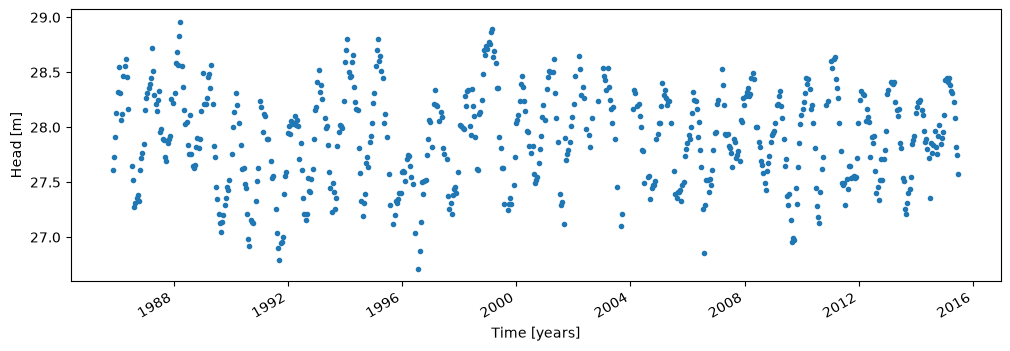
The series can be plotted as follows
ho.plot(style=".", figsize=(12, 4))
plt.ylabel("Head [m]")
plt.xlabel("Time [years]");
Load the stresses#
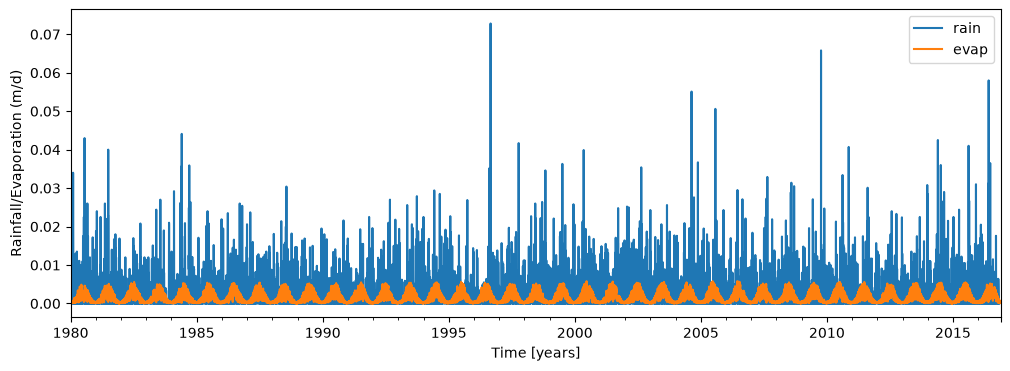
The head variation shown above is believed to be caused by two stresses: rainfall and evaporation. Measured rainfall is stored in the file rain_nb1.csv and measured potential evaporation is stored in the file evap_nb1.csv.
The rainfall and potential evaporation are loaded and plotted.
rain = pd.read_csv(
    "data/rain_nb1.csv", parse_dates=["date"], index_col="date"
).squeeze()
print("The data type of the rain series is:", type(rain))

evap = pd.read_csv(
    "data/evap_nb1.csv", parse_dates=["date"], index_col="date"
).squeeze()
print("The data type of the evap series is", type(evap))

plt.figure(figsize=(12, 4))
rain.plot(label="rain")
evap.plot(label="evap")
plt.xlabel("Time [years]")
plt.ylabel("Rainfall/Evaporation (m/d)")
plt.legend(loc="best");
The data type of the rain series is: <class 'pandas.Series'>
The data type of the evap series is <class 'pandas.Series'>
Recharge#
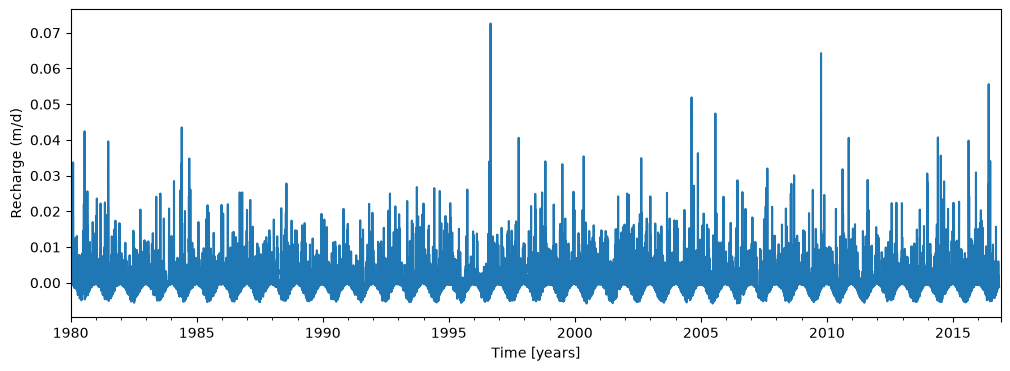
As a first simple model, the recharge is approximated as the measured rainfall minus the measured potential evaporation.
recharge = rain - evap
plt.figure(figsize=(12, 4))
recharge.plot()
plt.xlabel("Time [years]")
plt.ylabel("Recharge (m/d)");
First time series model#
Once the time series are read from the data files, a time series model can be constructed by going through the following three steps:
Create a
Modelobject by passing it the observed head series. Store your model in a variable so that you can use it later on.Add the stresses that are expected to cause the observed head variation to the model. In this example, this is only the recharge series. For each stress, a
StressModelobject needs to be created. EachStressModelobject needs three input arguments: the time series of the stress, the response function that is used to simulate the effect of the stress, and a name. In addition, it is recommended to specified thekindof series, which is used to perform a number of checks on the series and fix problems when needed. This checking and fixing of problems (for example, what to substitute for a missing value) depends on the kind of series. In this case, the time series of the stress is stored in the variablerecharge, the Gamma function is used to simulate the response, the series will be called'recharge', and the kind isprecwhich stands for precipitation. One of the other keyword arguments of theStressModelclass isup, which means that a positive stress results in an increase (up) of the head. The default value isTrue, which we use in this case as a positive recharge will result in the heads going up. EachStressModelobject needs to be stored in a variable, after which it can be added to the model.When everything is added, the model can be solved. The default option is to minimize the sum of the squares of the errors between the observed and modeled heads.
ml = ps.Model(ho)
ps.ArNoiseModel(model=ml)
sm1 = ps.StressModel(
    model=ml, stress=recharge, rfunc=ps.Gamma(), name="recharge", settings="prec"
)
ml.solve(tmin="1985", tmax="2010")
Fit report head                     Fit Statistics
==================================================
nfev     14                     EVP          92.02
nobs     518                    R2            0.92
noise    True                   RMSE          0.13
tmin     1985-11-14 00:00:00    AICc      -2592.15
tmax     2010-01-01 00:00:00    BIC       -2571.02
freq     D                      Obj            nan
freq_obs None                   ___
warmup   3650 days 00:00:00     Interp.         No

Parameters (5 optimized)
==================================================
                optimal     initial  vary
recharge_A   749.406955  215.674528  True
recharge_n     1.048995    1.000000  True
recharge_a   134.596045   10.000000  True
constant_d    27.547482   27.900078  True
noise_alpha   58.995992   15.000000  True
The solve function has a number of default options that can be specified with keyword arguments. One of these options is that by default a fit report is printed to the screen. The fit report includes a summary of the fitting procedure, the optimal values obtained by the fitting routine, and some basic statistics. The model contains five parameters: the parameters \(A\), \(n\), and \(a\) of the Gamma function used as the response function for the recharge, the parameter \(d\), which is a constant base level, and the parameter \(\alpha\) of the noise model, which will be explained a little later on in this notebook.
The results of the model are plotted below.
ml.plot(figsize=(12, 4));
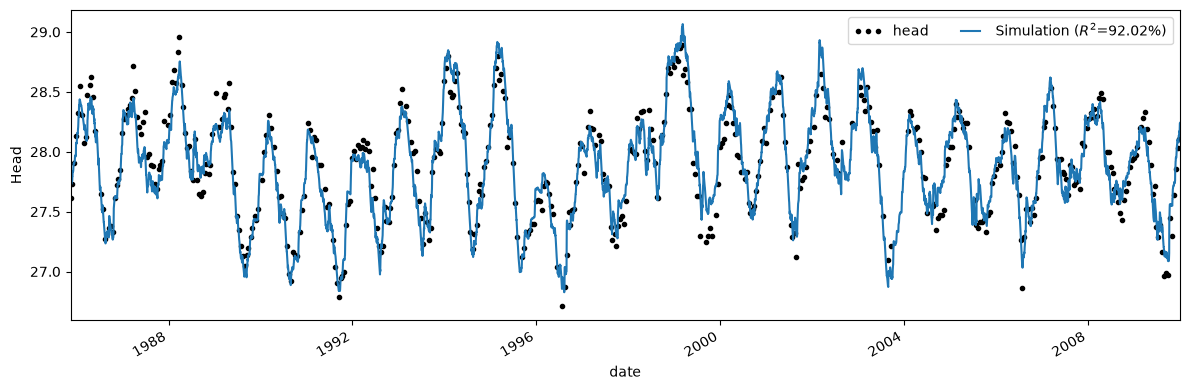
ml = ps.Model(ho)
ml.add_noisemodel(ps.ArNoiseModel())
sm1 = ps.StressModel(recharge, ps.Gamma(), name="recharge", settings="prec")
ml.add_stressmodel(sm1)
ps.solver.LeastSquares(model=ml)
ml.solve(tmin="1985", tmax="2010")
Fit report head                     Fit Statistics
==================================================
nfev     14                     EVP          92.02
nobs     518                    R2            0.92
noise    True                   RMSE          0.13
tmin     1985-11-14 00:00:00    AICc      -2592.15
tmax     2010-01-01 00:00:00    BIC       -2571.02
freq     D                      Obj            nan
freq_obs None                   ___
warmup   3650 days 00:00:00     Interp.         No

Parameters (5 optimized)
==================================================
                optimal     initial  vary
recharge_A   749.406955  215.674528  True
recharge_n     1.048995    1.000000  True
recharge_a   134.596045   10.000000  True
constant_d    27.547482   27.900078  True
noise_alpha   58.995992   15.000000  True
/home/docs/checkouts/readthedocs.org/user_builds/pastas/envs/latest/lib/python3.14/site-packages/pastas/decorators.py:276: FutureWarning: From Pastas 2.4, the first argument of ArNoiseModel needs to be a Pastas Model. Please provide the model as the first argument: ArNoiseModel(model=ml, ...).
  warn(message=msg % (self._name, self._name), category=FutureWarning)
/home/docs/checkouts/readthedocs.org/user_builds/pastas/envs/latest/lib/python3.14/site-packages/pastas/decorators.py:69: FutureWarning: add_noisemodel is deprecated and will not be available from Pastas version >= 2.4.0. Noise models are now added by adding the Pastas Model as the first argument during noise model initialization (i.e., ps.ArNoiseModel(model=ml, *args))
  warn(message=msg, category=FutureWarning)
/home/docs/checkouts/readthedocs.org/user_builds/pastas/envs/latest/lib/python3.14/site-packages/pastas/decorators.py:276: FutureWarning: From Pastas 2.4, the first argument of StressModel needs to be a Pastas Model. Please provide the model as the first argument: StressModel(model=ml, ...).
  warn(message=msg % (self._name, self._name), category=FutureWarning)
/home/docs/checkouts/readthedocs.org/user_builds/pastas/envs/latest/lib/python3.14/site-packages/pastas/decorators.py:69: FutureWarning: add_stressmodel is deprecated and will not be available from Pastas version >= 2.4.0. Stressmodels are now added by adding the Pastas Model as the first argument during stressmodel initialization (i.e., ps.Stressmodel(model=ml, *args))
  warn(message=msg, category=FutureWarning)
Fixing a parameter#
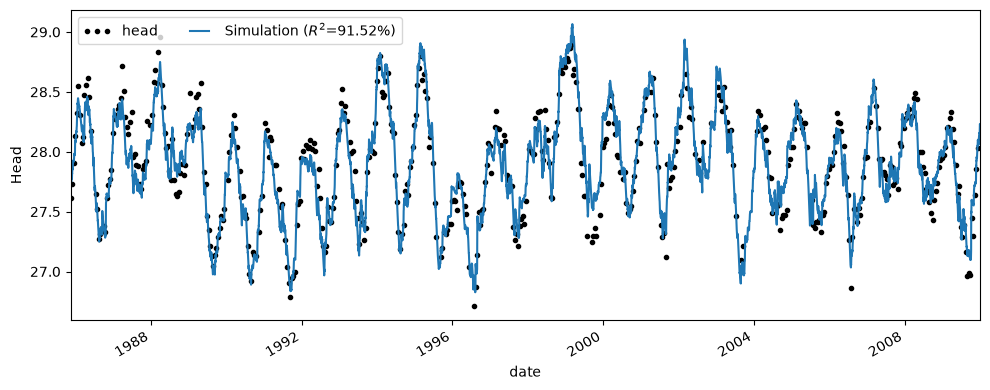
Now let’s fix the parameter recharge\(_n\) and solve the model again. We can do this by using the Model.set_parameter method and setting vary=False. For the sake of this example, we also fix the parameter to a value of 1.0, such that the Gamma response function becomes an Exponential function.
ml = ps.Model(ho)
ps.ArNoiseModel(model=ml)
sm1 = ps.StressModel(
    model=ml, stress=recharge, rfunc=ps.Gamma(), name="recharge", settings="prec"
)
ml.set_parameter("recharge_n", vary=False, initial=1)
ps.solver.LeastSquares(model=ml)
ml.solve(tmin="1985", tmax="2010")
Fit report head                     Fit Statistics
==================================================
nfev     27                     EVP          91.52
nobs     518                    R2            0.92
noise    True                   RMSE          0.13
tmin     1985-11-14 00:00:00    AICc      -2584.55
tmax     2010-01-01 00:00:00    BIC       -2567.62
freq     D                      Obj            nan
freq_obs None                   ___
warmup   3650 days 00:00:00     Interp.         No

Parameters (4 optimized)
==================================================
                optimal     initial   vary
recharge_A   776.735308  215.674528   True
recharge_n     1.000000    1.000000  False
recharge_a   153.739612   10.000000   True
constant_d    27.534815   27.900078   True
noise_alpha   64.122410   15.000000   True
In the fit report, you will see that the parameter recharge\(_n\) is now not varied anymore and kept to the value of one.
ml.plot(figsize=(10, 4));